Security awareness training
Build, deliver, and measure a recurring security-awareness program for enrolled employees.
Overview
The Training module helps you run a recurring security-awareness program from elba. Start with content from the training library, tailor it to your organization, choose the audience and delivery pace, then follow completion from the reporting view.
Only employees who are both enrolled in elba and included in a training's audience receive that training.
Browse the training catalog
Open Trainings → Catalog to search modules and filter by category. Open a module to read its description, duration, and availability. Browsing does not assign training, record completion, or change your program. Unavailable modules cannot be added.
Add to program opens the existing program editor. Adding and saving are explicit steps; canceling leaves the program unchanged. Modules already in your program are identified.
New modules are announced after a deliberate catalog publication. Eligible owners and administrators receive an email for the confirmed batch; viewing or editing a module does not announce it. Manage your own catalog emails in Communications → My notifications. This personal choice does not change other administrators' preferences or employee email, Slack, Google Chat, or Teams messages. An announcement does not add modules to your program automatically.
Build your training program
Open Training in the elba admin portal, then open the program configuration.
Choose training content
Use the training library to assemble your program. You can:
- Add or remove a training
- Reorder the program
- Copy an existing training and customize it
- Create organization-specific content
- Define an audience for each training, using everyone or selected groups
Review the complete sequence before activation. New employees enter the program from its beginning after they are enrolled and included in the relevant audiences.
Configure delivery
Set:
- The delay between enrollment and the first training
- The frequency for subsequent training assignments
- Whether quizzes are enabled
- Whether elba keeps the program running (see below)
Training notifications go to the channel each employee chose, or otherwise to the default communication channel set in Communication Preferences. Employees can receive them through email, Slack, Microsoft Teams, or Google Chat and complete the training through the employee experience or member portal. When elba cannot reach an employee on a chat channel, it falls back to email. See Which channel elba uses.
Activate, pause, or resume
Activate the program when its content, audiences, and delivery settings are ready.
- Pause stops new training assignments without removing employees' existing progress or previously assigned training.
- Resume restarts new assignments using the saved program configuration.
Create a custom training
Open the training editor and choose to start from a prompt or from scratch.
When starting from a prompt, you can describe what employees should learn and optionally add one PDF as source material. elba generates a draft training and, when enabled, a draft quiz. Always review generated content for accuracy and alignment with your policies before publishing it.
In the editor, you can:
- Edit explanations and guidance
- Add or change images
- Create and edit questions and answers
- Preview the employee experience
- Add translated versions
Supported employee languages are English, French, German, Spanish, Italian, Portuguese, Japanese, and Chinese.
For an administrator, after saving, the training is in Program → Edit program → Add training → Custom. It remains in Available trainings until you add it to the program. If saving fails, the editor keeps your work so you can retry without recreating the training.
Delegate training creation
An owner or administrator can give an enrolled colleague permission to create courses without promoting them to administrator.
- Open Team → Users, open the colleague’s actions and choose Allow course creation.
- The colleague chooses Create courses in their member portal. My courses contains their saved courses and a Create training action. They can start from an elba template, a prompt or from scratch, then preview and save.
- Saving returns them to My courses, where Resume editing reopens their course. An administrator finds it in Program → Edit program → Add training → Custom and chooses the audience and delivery separately. Granting permission or saving never sends a course to employees.
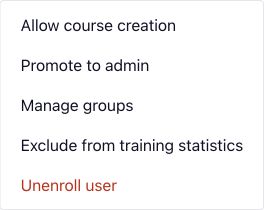
Authors can edit only their own courses. Once a course is used in a program, an activated Playbook or an employee assignment, it becomes read-only for its author. An administrator handles further changes.
To remove this permission, use Revoke course creation in the same user menu. Saved courses are retained. Unsaved work stays in the open editor tab but cannot be saved after revocation.
Acknowledge a document in a training
Use a custom training when employees need to explicitly acknowledge your charter or another PDF. A PDF used to generate a draft training is not automatically the document employees must acknowledge.
- In the custom training editor, enable document acknowledgement and choose the PDF employees should read. The file must be at most 10 MB, without password protection or hidden layers.
- Review the document and version in the publication dialog, then save. Selecting, previewing or replacing the file does not send training. Sending to employees remains a separate action.
- After the training steps, employees open an authenticated page from the web, Slack, Google Chat or Microsoft Teams. They read the presented version, select the confirmation checkbox and acknowledge it. The training completes when acknowledgement is recorded; downloading the document alone does not complete it.
- Employees can download their proof. Administrators can find the acknowledgement state, version, date and individual proof in Training reporting. Download proofs for selected employees or the filtered list in an archive of at most 100 proofs, with an index. The CSV remains one file and keeps the usual training fields.
Employees can resume an interrupted journey. If the document changes before acknowledgement, they must review the current version before confirming. Existing acknowledgements and completed training remain recorded. To ask people who already completed it to acknowledge a new version, explicitly send the training again.
The proof includes the person's identity, the exact document, its version, fingerprint and server-recorded date. It establishes the recorded acknowledgement, not a certified electronic signature or proof of comprehension.
Proofs are retained when a person is deactivated or deleted, but there is not yet a screen to retrieve those former people's proofs. Archive indexes are in English; proofs from Japanese or Chinese journeys use English.
Existing Charter module
For organizations already eligible for the Charter module, the preview shows the current version. Acknowledgements recorded before versioning remain marked as unknown version; elba does not retrospectively attach them to today's document.
An actual charter change goes through a draft and publication review. The default keeps existing acknowledgements. Alternatively, explicitly request renewed acknowledgement from the module's existing organization-wide audience: review the affected count and consequences before confirming. History is preserved, and affected people return to a pending acknowledgement. Employees go directly to the charter acknowledgement. Existing periodic reminders apply; publication does not send an extra immediate message.
When a person has acknowledged the current version, there is not yet a screen for retrieving their earlier-version proofs. This update does not make the Charter module available to additional organizations.
Use quizzes
New organizations start with quizzes enabled. Existing organizations keep their previous setting. Review or change it in Training → Program → Settings before activating your program.
Employees who meet the passing condition shown in the product can complete the assignment through the quiz without following the full training; other employees continue through the full training. Decide whether this completion rule fits your program before leaving quizzes enabled.
Quiz results are included in employee reporting. Review generated questions and answers before enabling a training.
Keep the program running
When Keep the program running is on, elba checks your program every day. If some employees are about to have no training left within one program period, elba adds the next 2 library modules suitable for every employee to the end of your program. The program then assigns them at its usual frequency.
- Only library modules marked as suitable for every employee are added, in library order. Developer, role, tool and regulation modules are never added automatically.
- elba never adds a module that is in your program, that was in it before (for example one you removed), or that you customized.
- Added modules are marked Added by elba in the program, and the notification center shows how many were added. You can remove any of them like any other training.
- elba adds at most one batch per program period.
- A program whose modules all target specific groups is not continued: elba only adds modules for everyone when your program already has at least one module for everyone.
New organizations start with it on. Existing organizations keep it off until an administrator turns it on in Training → Program → Settings.
Find training playbooks
Open Trainings → Playbooks, between Reporting and Catalog, to find available templates that assign training and your already configured training playbooks. Consult library opens the existing library. The source label links to the detection module; source filters help you find the relevant templates. Your configured list shows each playbook's source and current status.
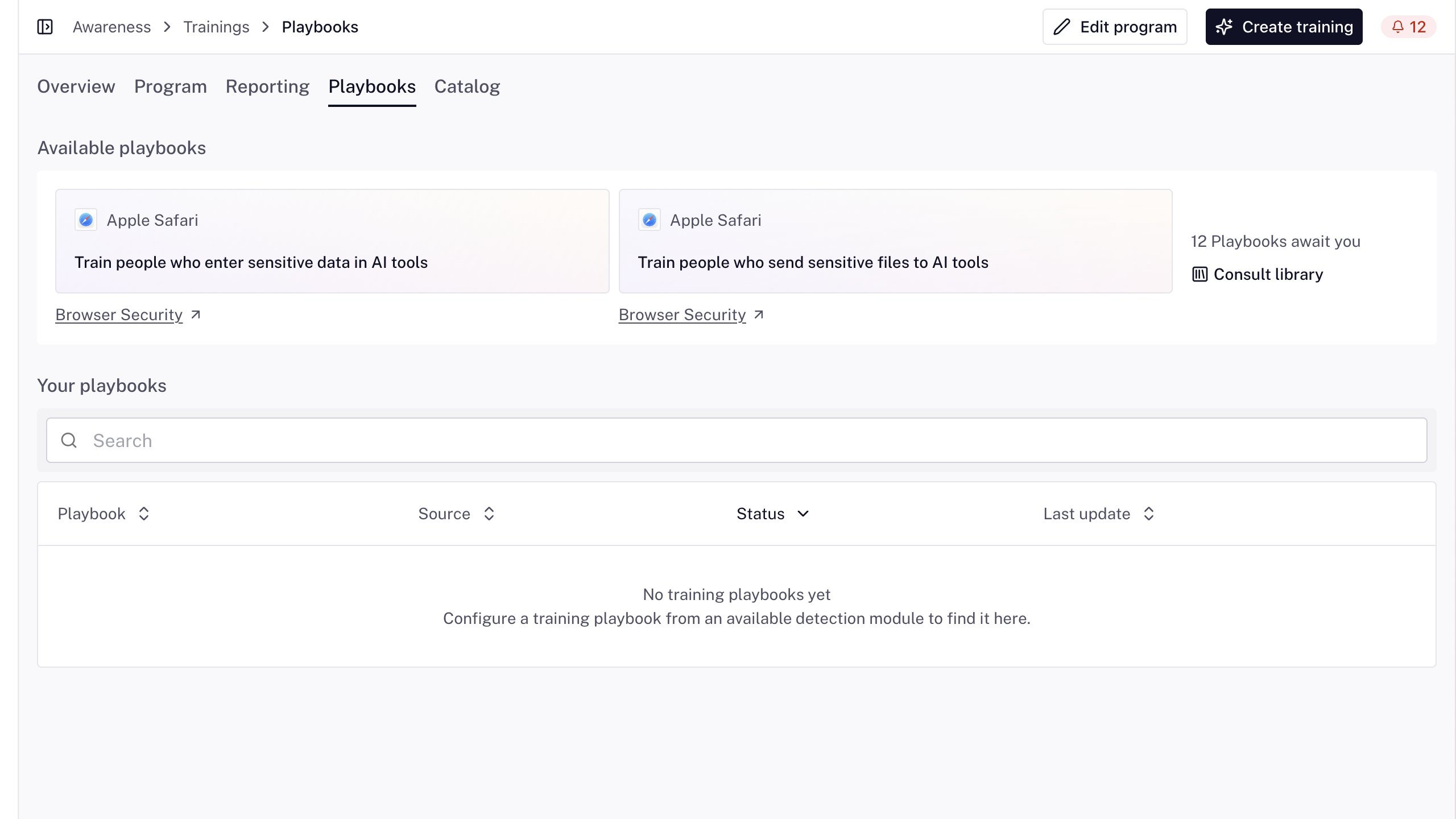
This view and the originating Security or Phishing module open the same playbook and editor. Changes saved through either entry affect that existing playbook. If you only want to inspect it, leave without saving and confirm that you want to discard any unsaved edits; returning brings you back to the entry you used.
You can browse with the recurring training program off. A disconnected or unavailable detection source still needs its existing connection and activation requirements before it can run. Opening a template does not activate monitoring, assign a lesson or send a notification. On a narrow screen, scroll the Training tabs horizontally to reach the other destinations.
Training assigned by a playbook
A security detection can lead to one existing lesson through the Assign a training playbook action. An owner or administrator chooses the lesson, conditions and due period in the existing playbook editor. See Playbooks for setup, supported triggers and the boundary between new and existing detections.
The employee receives the lesson and due date through the existing training journey and can complete it in the member portal. A contextual assignment does not reset the recurring program, change its frequency or add a module to its sequence. It remains accessible when no recurring program is active.
elba skips a lesson the person has already received: pending, started or completed. Across playbooks in an organization, a person can receive at most one such assignment within seven days. These rules apply to contextual playbook assignments; manual reminders keep their separate limits.
A lesson the program only schedules for later is brought forward. When the chosen lesson is in the person's program but not available to them yet, the playbook does not skip it: the person receives it now, with the playbook's due period, and the program does not schedule it again.
- Nothing else in their program moves at that moment.
- The next time their program is recalculated (a saved change to the program, its order or its frequency, a change of group, a resume after a pause, or modules added by Keep the program running), their remaining lessons are spaced one period apart, as usual. The lessons that were scheduled after the one brought forward then come one period earlier.
- If it was the first lesson of their program and they have not received any other yet, the next lesson takes its date. When that date has already passed at the recalculation, the next lesson becomes available at once, with what is left of that period to complete it.
- If it was their last scheduled lesson, the person runs out of training one period sooner. With Keep the program running on, elba can then add its next modules to your program earlier.
Follow the assignment, due date and completion in the existing employee training details and Trainings → Reporting. Use the security module's playbook action history to distinguish an assignment from an eligibility, already-covered or coaching-limit skip. A recorded assignment is not confirmation that a notification was delivered or that the person completed it.
Publish training to Workday Learning
Organization owners and administrators can connect Workday Learning to publish Elba-managed courses and employee enrollments to Workday. Employees open an external lesson from Workday and complete the normal Elba training experience; Elba then mirrors configured progress, completion, and available quiz-score results back to Workday. Validate the integration in a Workday sandbox or implementation tenant before connecting production learners.
Elba remains the source of truth for assignments and results. The integration does not import Workday-created learning data or remove Workday records when an Elba assignment is deleted. See Connect Workday Learning for prerequisites, setup, validation, and operating limits.
Monitor the program
Open Home → Training → Overview → Reporting. Owners and administrators can read Training evidence, inspect the people and courses behind its totals, and download the same report as CSV or Excel.
Read the measures
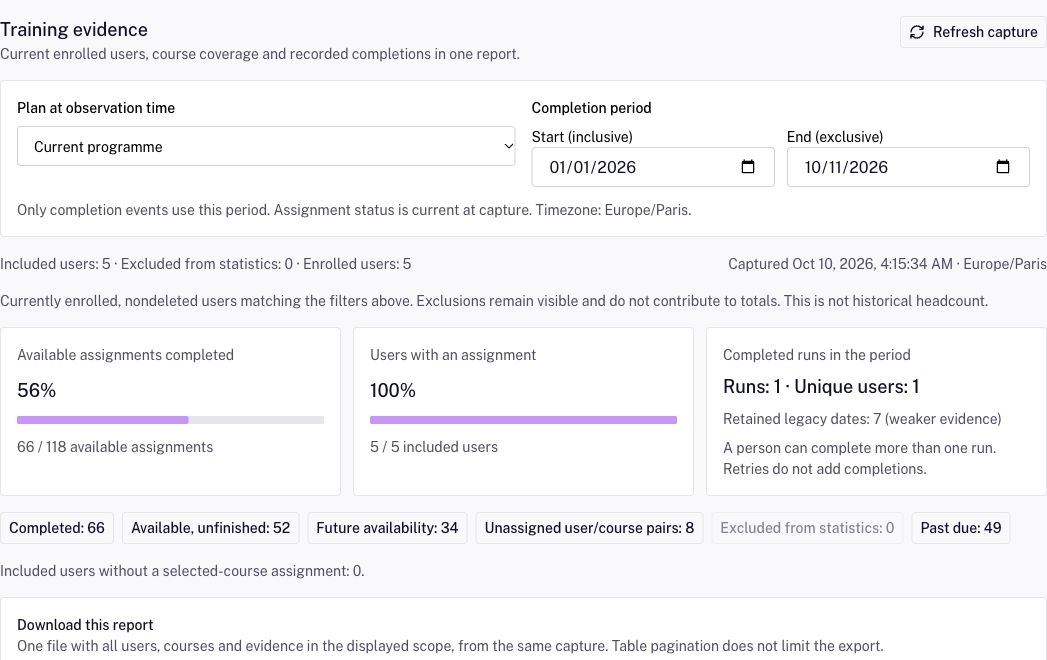
Home shows completed available assignments divided by available assignments for currently enrolled, nondeleted users included in statistics. This counts assignments: one person can have several. Overview also has measures that count people, such as coverage and engagement. The Reporting capture initially selects the Current programme; its course scope can differ from Home.
In Training evidence:
- Available assignments completed uses the selected courses' completed available assignments and available-assignment denominator. Future assignments are separate. No eligible assignment means the denominator is zero.
- Users with an assignment counts included people with at least one assignment for the selected courses, including future assignments, divided by included people. People without assignments remain in the population and downloads.
- Completed runs in the period separates genuine recorded runs, unique people and Retained legacy dates, which are weaker evidence. Several runs can belong to one person; retries do not add completions.
Choose and inspect a capture
Use the existing person, group, training and status filters above the report. Choose Current programme or Selected courses to inspect retained courses, including those outside the current programme. With no courses selected, the report explains the empty scope and keeps the people and population totals.
Set Start (inclusive) and End (exclusive), with the end after the start. Only recorded completion events use this period; assignment states remain current at capture. Period boundaries use the displayed timezone, with an explicit UTC fallback when needed. The capture timestamp and enrolled population describe the observation, not historical headcount.
Select a course, a person or Inspect evidence to drill into retained dates, assignment origin and completion channel. The state buttons select people with a matching assignment and retain all their evidence for the selected courses. Back to previous detail and Back to full report restore the broader scope. Totals and downloads follow the displayed detail scope.
Refresh capture obtains a new observation. Changed filters hide the previous result while loading. Cancel stops the pending capture; Retry capture recovers after cancellation or an error. For a report that is too large, narrow the people or courses and retry.
Download the matching report
Under Download this report, choose a mode, then Download CSV or Download Excel. Each action downloads one file containing the full displayed scope from that capture; table pagination does not limit it. Excel is a real workbook with Capture, Summary, Courses, People, Assignments, Completions and Definitions sheets. Both formats include period, timezone, capture and measure definitions; timestamps in the files are UTC. Column names stay in English; definitions follow the interface language.
Internal · names and emails includes identity fields and available quiz results. Auditor · pseudonymised omits names, emails, managers, groups, precise joining/enrolment dates, quiz scores and completion-record IDs. Person references are fresh for each file, so they cannot be used to join separate auditor exports. Course information and assignment/completion times remain: small cohorts can still identify people. Review the scope before sharing; pseudonymisation does not guarantee anonymity.
An empty field means the fact is unavailable. A retained legacy date does not reconstruct earlier runs. Assignment is not proof of notification delivery or receipt; historical membership, onboarding delivery and progress inside a course are not reconstructed. A quiz score is not proof of knowledge, and the report is not a compliance certification.
Manage users and live progress
Expand Manage users · live progress and actions below the capture to use the existing employee table, individual training history, acknowledgement proofs and reminders. Its Export CSV is a separate history export. With no employee selected, it includes every employee matching the current table filters, without a selection limit; the selection bar exports only selected employees. It contains one row per recorded completion and one for each assignment without a completion, across those employees' assignments. A person without assignments has no row in this history CSV.
Follow due dates
Every assignment has a due date. A training of the program is due one program period after it becomes available. A training sent manually is due one month after it is sent; an employee who already had it available keeps the date they had.
Employees see the date on each training they still have to complete in the member portal: Due before followed by the date, then Overdue since once the deadline has passed. Completed trainings do not show it.
In Trainings → Reporting, the Past due column counts, for each employee, the available trainings that are not completed and whose deadline has passed. The Past due only filter keeps the employees who have at least one, and Export CSV follows it. Open an employee to see the due date of each assignment and which ones are Past due.
Past due follows deadlines. It is separate from the Behind status, which counts pending trainings whatever their deadline, and it changes neither that status nor any statistic. An employee who is no longer enrolled is never counted as past due.
Exclude a user from training statistics
If an enrolled user should keep access and training assignments but should not affect your reported results, an organization owner or administrator can open Team → Users, open that user's actions, and choose Exclude from training statistics. Confirm the change. The user remains enrolled; their sign-in, role, training assignments, reminders, completions, and individual records are unchanged. The action does not apply automatically to other administrators.
The excluded user is left out of both the numerator and denominator of training rates, statuses, scores, and trends, including displayed past periods and group/program breakdowns. The overview and program explain when users are excluded. Counts of enrolled users and assigned, completed, or upcoming training remain factual. The user still appears in Training → Reporting, marked Excluded from statistics. Its CSV export keeps their records and adds a Training statistics column showing Excluded or Included.
To review excluded users, use the Training statistics filter in Team → Users. To count a user again, open their actions and choose Include in training statistics. Their existing records remain available, and the displayed statistics recalculate with that user included. Group completion rates also now count each enrolled current group member's assignment separately; some previously displayed rates may change after this correction.
Review repeat completions
When an employee completes the same training again through the member portal or a supported chat channel, elba keeps each genuine completion as a separate dated record. Open the employee's training profile to review the recorded dates, or use Training → Reporting and its CSV export to analyze them. A retry of one completion is not another completed run. The latest assignment status and quiz result remain separate from the history of completed runs.
Older training records may contain only a retained legacy date. That date is shown as known evidence; it does not establish whether the employee completed the training on other earlier occasions. A past portal repeat that was never recorded cannot be reconstructed from this history. An assignment without a completion appears without a completion date in the export.
Follow overdue training as a manager
In the member portal, open Home → Your team → Overdue training. The existing Team view keeps your direct reports and their scores. Overdue training shows people, overdue courses, deadlines and whether each course was started. It does not show indirect reports' scores.
Direct reports are the default. An organization owner or administrator can open Trainings → Program → Edit → Customize, turn on Let managers follow up on their indirect reports and confirm the explanation. The program then shows Manager follow-up: Whole reporting line. Turning it off and confirming returns the scope to direct reports. Each manager sees their own reporting line, not everyone in the organization.
Reporting lines come from the connected directory. Only current relationships within the same organization count; people without a manager there, or whose manager has left, are outside the line. The view shows the last directory sync and follows at most 20 levels. Correct missing relationships in your directory, then let it synchronize with elba.
The list includes enrolled people's available, accessible, incomplete training with a known deadline that has passed. Unknown deadlines and completed courses are not overdue. Counts separate people from overdue trainings: one person can have several rows. Direct report or Via, followed by the direct report's name, explains the relationship. Use the branch filter to narrow the list; Export downloads its training rows without security scores.
Select people, or choose to remind everyone in the current list. Review the exact recipients and relationships before sending. Closing the review sends nothing. If someone completes their overdue training or leaves your reporting line before confirmation, elba sends none of that request, removes the ineligible people and asks you to review again. It never adds recipients silently. A request can include at most 1,000 people; use a branch or a smaller selection for a larger line.
Reminders use the existing channel preferences and 24-hour per-person limit described below. They prompt the person's oldest pending training, which may differ from the course you were looking at. Slack, Google Chat and Teams reminders name the initiating manager; email names them when they add a custom introduction. Queuing does not prove delivery or completion. Automatic manager updates keep their direct-report scope and configured cadence. See Sam and manager updates.
The new view is available in English and French; other member-portal languages display it in English. Export headings are in English.
Send training or reminders manually
To send a specific training outside the recurring sequence, select Send on that training in Trainings → Program. In Send a training course, choose the users or groups in Send to, choose a channel in Send via, and select Send training.
Employees who chose their own communication channel receive the training there. Everyone else receives it on the channel selected in Send via, or by email if they have no account on it. The confirmation message names the selected channel even when some employees receive the training on their own channel.
To remind employees who still have training to complete, expand Manage users · live progress and actions in Trainings → Reporting, select them and use Send reminder. Reminders go to each employee's own channel, then to the organization default channel, then to email.
Before sending, confirm that the selected employees are enrolled and that the training audience is appropriate.
For manual reminders, a recent accepted request for a person causes another request for that person within 24 hours to be skipped, even if a different administrator or manager starts it. The result shows how many people were queued for delivery and how many were skipped. If everyone was skipped, it says No reminder sent. A queued reminder is not confirmation that the employee received it. The automatic reminder cadence is unchanged.
Recommended launch checks
Before activating the program:
- Confirm employee enrollment and group membership.
- Review the training sequence and audiences.
- Preview custom and translated content.
- Confirm the default communication channel, any channels chosen by employees, and fallback behavior.
- Send a limited assignment and check the employee experience.
- Review reporting before expanding the audience.